- AI Business Insights
- Posts
- Which AI Model Is Best for You?
Which AI Model Is Best for You?
Picking models without regret
Yesterday I caught myself doing something I bet you do too. I opened my usual chatbot, typed a prompt on autopilot, and waited for magic. The answer was fine, but “fine” is a sneaky productivity killer. It’s like using a butter knife for everything because it’s already in your hand. You can still cook dinner, but you’ll work harder than you need to. The truth is simple: the model you default to is quietly shaping the quality, speed, and confidence of your work.
Using the same AI model for every single task is likely killing your productivity.
Most of us have a default chatbot we open every morning, but that habit ignores the reality that different models are built for different engines. I just saw a sharp breakdown from an AI professional that solves the “which tool do I use?” crisis once and for all. The big idea: stop treating AI like one product and start treating it like a toolkit. Once you do, you save hours of retries, rewrites, and second-guessing.
In partnership with

Hiring in 8 countries shouldn't require 8 different processes

This guide from Deel breaks down how to build one global hiring system. You’ll learn about assessment frameworks that scale, how to do headcount planning across regions, and even intake processes that work everywhere. As HR pros know, hiring in one country is hard enough. So let this free global hiring guide give you the tools you need to avoid global hiring headaches.
The Era of Model Specialization
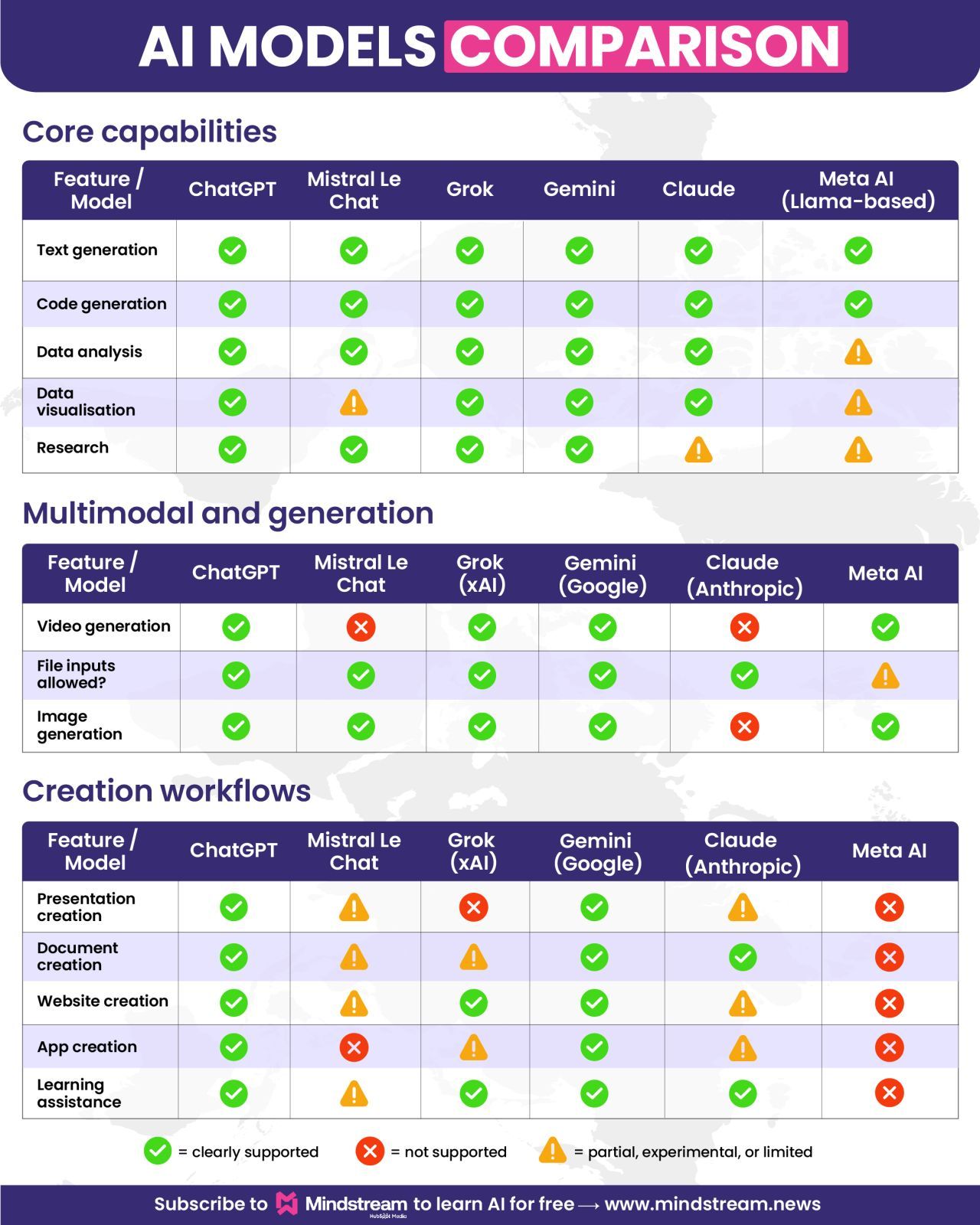
This isn’t about finding one model that beats everything. It’s about knowing which model to reach for when the job changes. The analysis compared major players like ChatGPT, Grok, Mistral Le Chat, Claude, and Meta AI across thirteen categories, and the results were a reminder: strengths are not evenly distributed.
One model might shine when you need tone, persuasion, and creative flow. Another might be better when you need structured thinking, step-by-step logic, or clean code. When you switch models like you switch tools, you stop forcing one system to do work it was never optimized for.
Comparing Core Competencies
At the basics, most models can write and summarize, but the differences show up fast when the task gets real. Think: debugging a stubborn script, learning a new concept without confusion, or turning messy notes into a usable plan. Some models are tuned for “sounds human,” which is perfect for emails, sales pages, or sensitive communication. Others are tuned for “stays consistent,” which matters when you’re working with rules, constraints, or technical outputs.
Pay attention to practical details that affect your day. Does the platform handle file uploads smoothly, or does it choke on PDFs and spreadsheets? Can it cite sources clearly when you ask for research, or do you end up verifying everything from scratch? Picking the right model is often less about raw intelligence and more about fewer friction points.
Visuals and Creation Tools
We’re quickly moving past text-only chat. The pro who did this comparison looked at features like video generation, image creation, and data visualization, plus “builder” abilities that create real assets. Some platforms can help you draft presentations, write documents, generate web pages, or even scaffold functional apps.
This is where AI stops being just a brainstorming partner and becomes a production assistant. If your model can generate a first draft you can actually use, you reduce the gap between idea and output. And that gap is where most projects quietly die.
Go from AI overwhelmed to AI savvy professional

AI will eliminate 300 million jobs in the next 5 years.
Yours doesn't have to be one of them.
Here's how to future-proof your career:
Join the Superhuman AI newsletter - read by 1M+ professionals
Learn AI skills in 3 mins a day
Become the AI expert on your team
*Ad
Other awesome AI guides you may enjoy
Navigating Risks and Ethics
Even the best model can create problems if you use it casually. The warning here is straightforward: don’t paste confidential, regulated, or sensitive information into generic tools unless you understand the privacy rules. Keep humans in the loop for high-stakes calls, especially medical, legal, or financial decisions.
Use ethical constraints as part of your workflow, not as an afterthought. Assume occasional errors, plan for verification, and build habits that prevent “confident nonsense” from slipping into your work. That’s how you get the upside of AI without inviting the downside.
To see the full breakdown of which model won each category, check out the original post!
Credits Adam Biddlecombe
AI-native CRM

“When I first opened Attio, I instantly got the feeling this was the next generation of CRM.”
— Margaret Shen, Head of GTM at Modal
Attio is the AI-native CRM for modern teams. With automatic enrichment, call intelligence, AI agents, flexible workflows and more, Attio works for any business and only takes minutes to set up.
Join industry leaders like Granola, Taskrabbit, Flatfile and more.
*Ad