- AI Business Insights
- Posts
- Google’s AI Suite Redefines Smart Work
Google’s AI Suite Redefines Smart Work
Less Homework, More Leverage
I used to wear “busy” like a badge. Calendar packed, tabs everywhere, Slack on fire. And at the end of the day, I’d still feel oddly behind. Here’s the uncomfortable truth: being “maxed out” is not proof you’re winning.
This talented creator made a point that hit me right in the chest, and it boils down to one word: leverage. Google’s latest AI stack is basically a cheat code for turning effort into output, if you use it like an operator, not a tourist.
In partnership with

Turn AI into Your Income Engine
Ready to transform artificial intelligence from a buzzword into your personal revenue generator?
HubSpot’s groundbreaking guide "200+ AI-Powered Income Ideas" is your gateway to financial innovation in the digital age.
Inside you'll discover:
A curated collection of 200+ profitable opportunities spanning content creation, e-commerce, gaming, and emerging digital markets—each vetted for real-world potential
Step-by-step implementation guides designed for beginners, making AI accessible regardless of your technical background
Cutting-edge strategies aligned with current market trends, ensuring your ventures stay ahead of the curve
Download your guide today and unlock a future where artificial intelligence powers your success. Your next income stream is waiting.
The Ecosystem Advantage
For years, “productivity” meant stitching together a dozen tools that barely talk to each other. One app for research. Another for writing. Another for code. Another for visuals. Then you spend half your day copy-pasting between them and calling it progress.
What the author argues is different about Google’s approach is the ecosystem play. Reasoning, creation, search, and coding are being pulled into one fluid workflow. So instead of asking an AI a question and then doing the hard parts yourself, you’re starting to hand off whole chunks of the process. The big shift is agentic capability: tools that can reason through messy inputs, keep context, and move work forward across formats, not just spit out answers.
If you’ve ever thought, “I don’t need more ideas, I need the work done,” this is the direction things are heading.
Visuals and Collaboration
This part is where it gets real for teams (and for anyone who works with clients). Canvas isn’t positioned as “a doc” or “a code editor.” It’s more like a shared work surface where ideas become assets. You can draft, iterate, and produce things that usually require switching tools: presentations, simple websites, infographics, and more.
Add in video generation like Veo and native image creation, and the distance between “I have a concept” and “here’s the finished thing” shrinks dramatically. That’s not just convenient. It changes who can ship. The people who used to be blocked by design bottlenecks or dev bottlenecks suddenly have momentum.
Accelerated Learning
NotebookLM is the sleeper feature that matters if you’re drowning in information. Most people don’t have a knowledge problem, they have a processing problem. You save articles, PDFs, notes, docs, transcripts… and then never touch them again because it feels like homework.
NotebookLM flips that. It helps turn your inputs into usable outputs: summaries, structured notes, mind maps, even audio-style explanations so you can absorb faster. Pair that with guided learning in Gemini and you’re basically building a personal tutor that meets you where you are, then walks you forward step-by-step. Less “stare at the mountain,” more “take the next foothold.”
Stop typing prompt essays

Dictate full-context prompts and paste clean, structured input into ChatGPT or Claude. Wispr Flow preserves your nuance so AI gives better answers the first time. Try Wispr Flow for AI.
*Ad
Other awesome AI guides you may enjoy
No-Code Building
The most exciting part for non-technical people is the “build your own tools” layer. Creating a custom assistant (a Gem) without code means you can design something that matches your workflow instead of adapting your workflow to whatever generic chatbot you opened.
And if you want to go a level deeper, AI Studio pushes into “describe the app you want” territory. That’s a big deal because it bridges the gap between creative operators and functional software. You don’t need to become a developer to prototype like one.
The Learning Curve
The only catch: tool overload is real. When there are two dozen options, it’s easy to fall into feature fatigue. You start “optimizing” your setup and accidentally make that your full-time job.
The smarter move is ruthless focus. Pick one bottleneck. Choose the tool that removes it. Ship the result. Then expand only when the next constraint shows up.
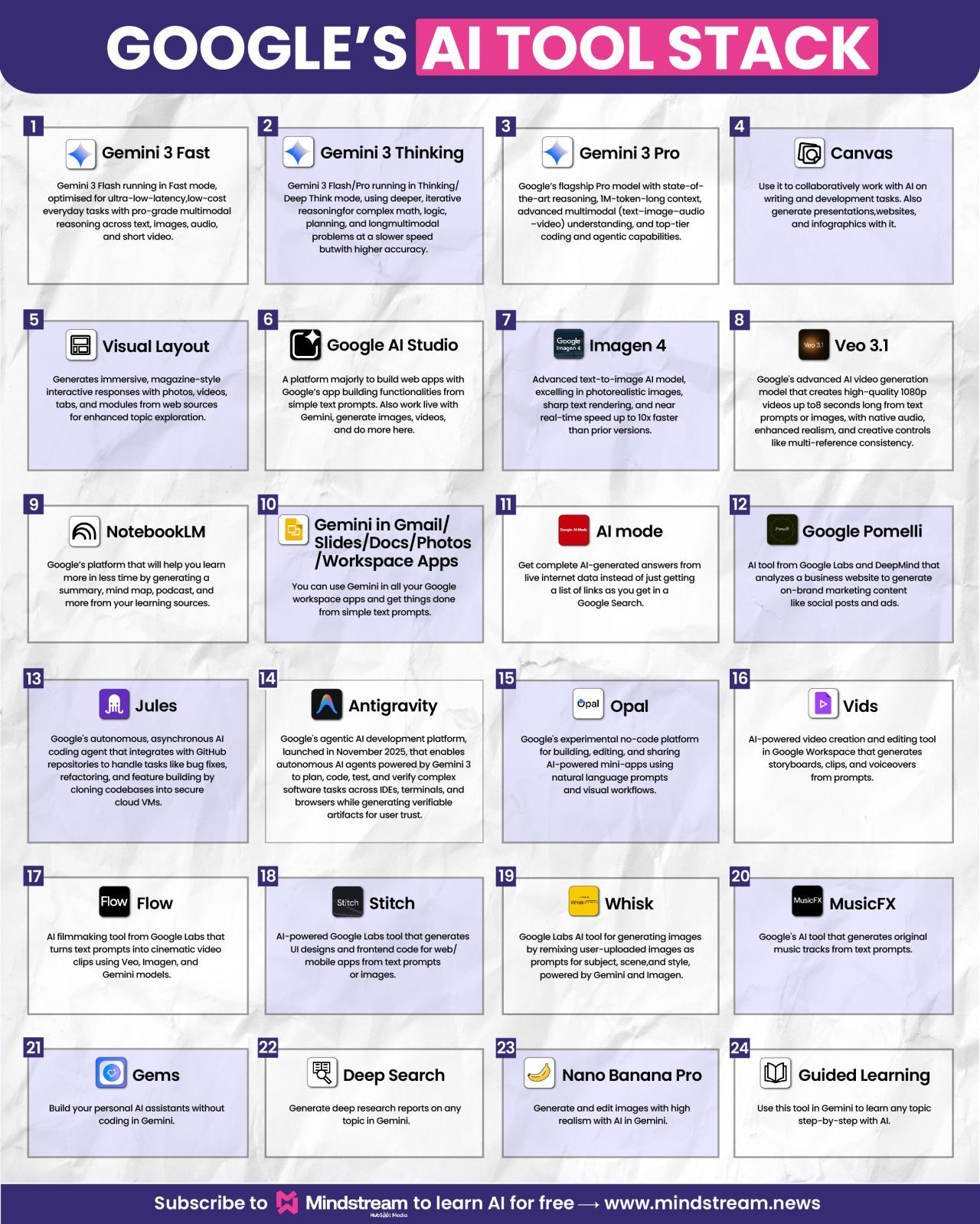
Credits Adam Biddlecombe
AI in HR? It’s happening now.

Deel's free 2026 trends report cuts through all the hype and lays out what HR teams can really expect in 2026. You’ll learn about the shifts happening now, the skill gaps you can't ignore, and resilience strategies that aren't just buzzwords. Plus you’ll get a practical toolkit that helps you implement it all without another costly and time-consuming transformation project.
*Ad